![Logo_IMS Technology Group_Final_IMS TG_Logo_Dark Bkg.svg]](https://knowledge.imstechnologygroup.com/hubfs/Logo_IMS%20Technology%20Group_Final_IMS%20TG_Logo_Dark%20Bkg.svg)
- Hover over your name (FB 7.5) or the user profile icon
 (FB 8.0 )in the upper right hand corner of the screen .
 - Click Preferences.
- Click Select All in the Grid Settings section.
- Click Restore Grids. FB 7.5.x.x
 FB 8.0.x.x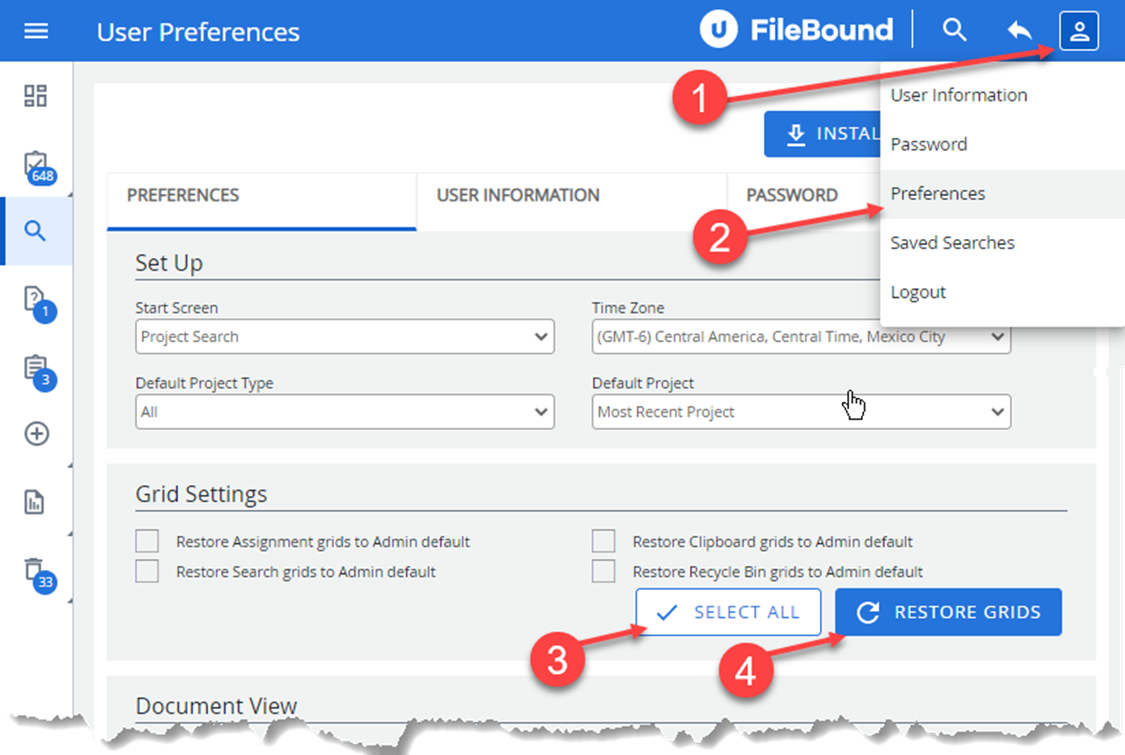
- You should see the added index fields on your Assignment Grid, Project Search Criteria screen and search results screen now.