![Logo_IMS Technology Group_Final_IMS TG_Logo_Dark Bkg.svg]](https://knowledge.imstechnologygroup.com/hubfs/Logo_IMS%20Technology%20Group_Final_IMS%20TG_Logo_Dark%20Bkg.svg)
- Confirm the scanner is connected correctly to your computer, then power on the scanner.
- Select the [Start] menu, [All Programs], [Scanner Utility for Microsoft Windows] or [fi Series], [Software Operation Panel].
- The [Fujitsu Software Operation Panel] window should appear.
- From the tree listing on the left, select [Device Setting].
- The following panel appears.
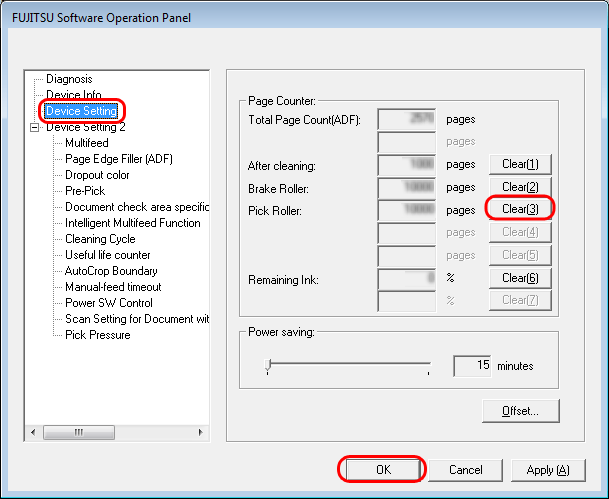
- The following panel appears.
- Click the [Clear] button beside the [Pick Roller] counter
- Click the [OK] button on the confirmation panel displayed.
- The counter is reset to 0.
- Click the [OK] button on the [Fujitsu Software Operation Panel] window.