![Logo_IMS Technology Group_Final_IMS TG_Logo_Dark Bkg.svg]](https://knowledge.imstechnologygroup.com/hubfs/Logo_IMS%20Technology%20Group_Final_IMS%20TG_Logo_Dark%20Bkg.svg)
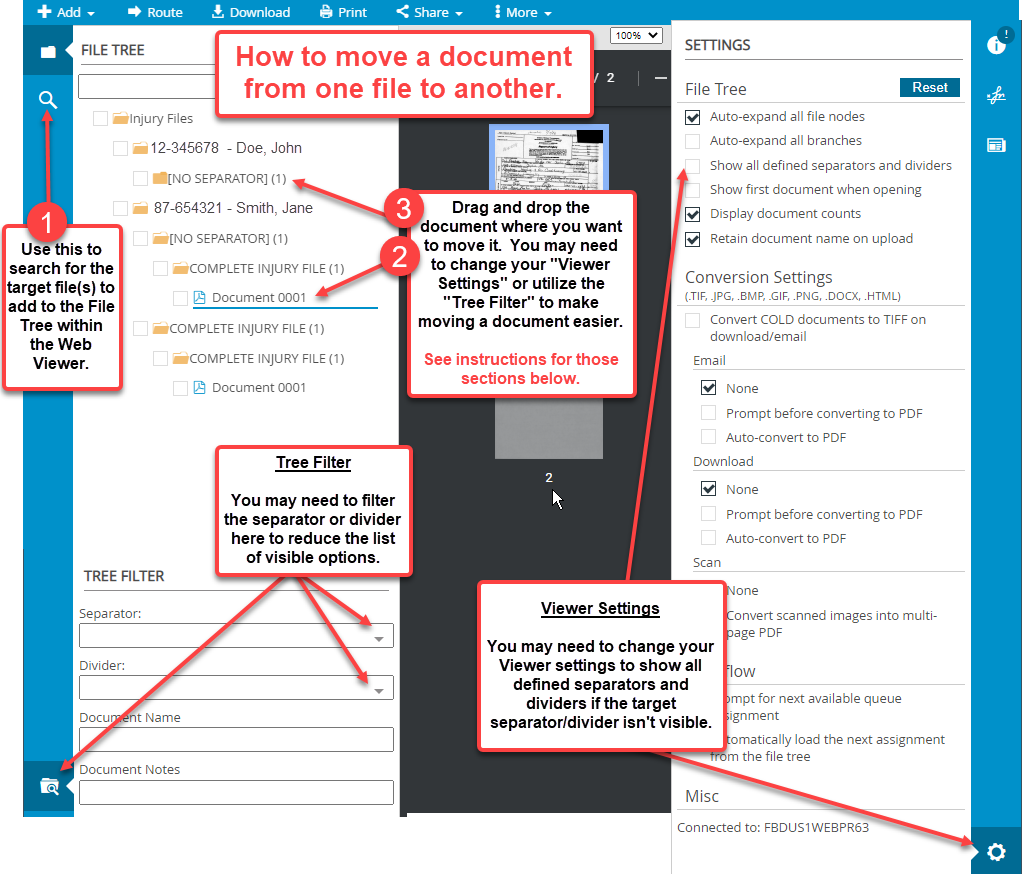
- Use the File Search functionality within the Web Viewer to search for the target file(s) to add to the File Tree.
- Select the desired document to be moved.
- Drag and drop the document where you want to move it. You may need to change your Viewer Settings or utilize the Tree Filter to make moving a document easier. See instructions and screenshot for these sections below.
- Viewer Settings - You may need to change your Viewer settings to show all defined separators and dividers if the target separator/divider isn't visible.
- Tree Filter - You may need to filter the separator or divider to reduce the list of visible options.