![Logo_IMS Technology Group_Final_IMS TG_Logo_Dark Bkg.svg]](https://knowledge.imstechnologygroup.com/hubfs/Logo_IMS%20Technology%20Group_Final_IMS%20TG_Logo_Dark%20Bkg.svg)
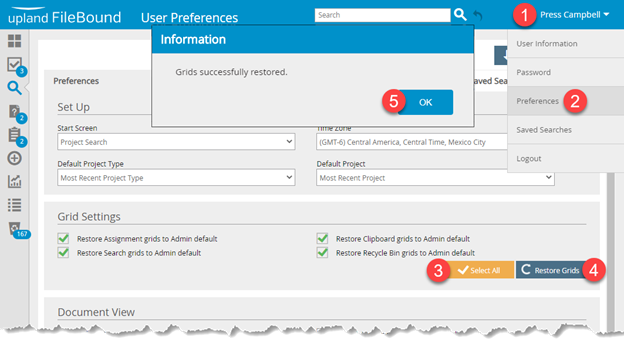
- When you are signed in to FileBound, hover over your name in the upper right hand corner of the screen.
- Select Preferences from the drop down list.
- Select All to select all grids to the default setting.
- Click Restore Grids.
- Click OK on the Grids successfully restored message.
Note: If the index field is still not showing, you may need to clear your temporary internet files and try again. See this article for clearing your temporary internet files.