![Logo_IMS Technology Group_Final_IMS TG_Logo_Dark Bkg.svg]](https://knowledge.imstechnologygroup.com/hubfs/Logo_IMS%20Technology%20Group_Final_IMS%20TG_Logo_Dark%20Bkg.svg)
By default, logs can be accessed directly from c:\Program Files (x86)\FileBound\ES Manager\Services\[INSTANCE NAME\logs as text files.
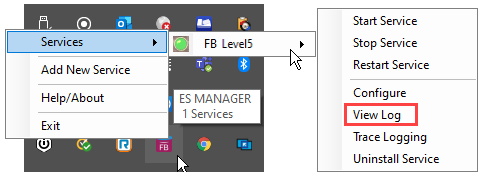
Logs can also be accessed from with the ES Manager. To view the logs from the ES Manager do the following:
- Right click the ES Manager icon in the system tray à hover over Services à hover over the [Instance Name] à select View Log
- Navigating the logs:
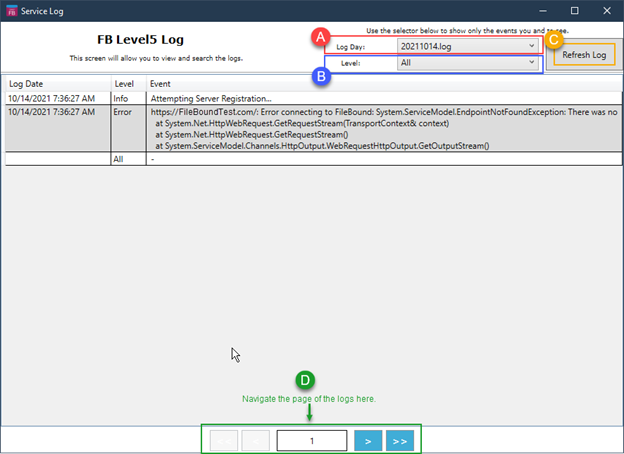
- Change the Log Day to the day to view a specific day.
- Change the level to filter the events.
- Refresh the logs by clicking on Refresh Log to see events have occurred since the logs were opened.
- Different pages of the logs can be viewed via the page navigation bar at the bottom of the screen.