![Logo_IMS Technology Group_Final_IMS TG_Logo_Dark Bkg.svg]](https://knowledge.imstechnologygroup.com/hubfs/Logo_IMS%20Technology%20Group_Final_IMS%20TG_Logo_Dark%20Bkg.svg)
- Select a file to view in the windows viewer.
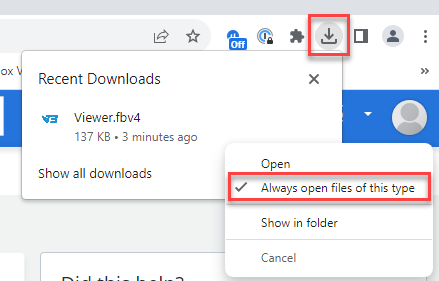
- Locate the Viewer.fbv4 download at the top of the Chrome browser.
- Right click to the right of View.fbv4, and select Always open files of this type from the pop-out menu (shown below).
-
The windows viewer should then open and going forward should automatically open.