![Logo_IMS Technology Group_Final_IMS TG_Logo_Dark Bkg.svg]](https://knowledge.imstechnologygroup.com/hubfs/Logo_IMS%20Technology%20Group_Final_IMS%20TG_Logo_Dark%20Bkg.svg)
To save workflow comments as a variable for future use, follow these steps:
1) Add a Custom Action stencil to your workflow.
2) Add the "Create Form Data And Extra Data" action to your stencil.
3) Select "EFormData (Document)" for the Type.
4) Provide a variable name. For example, "WorkflowComment".
5) In the "Value" field, select the "Get Variable" action. 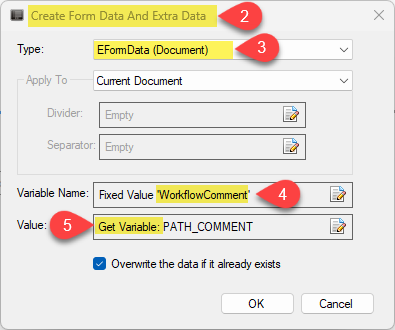
6) The variable name for this action will be PATH_COMMENT.
7) The context will be "RoutePath". 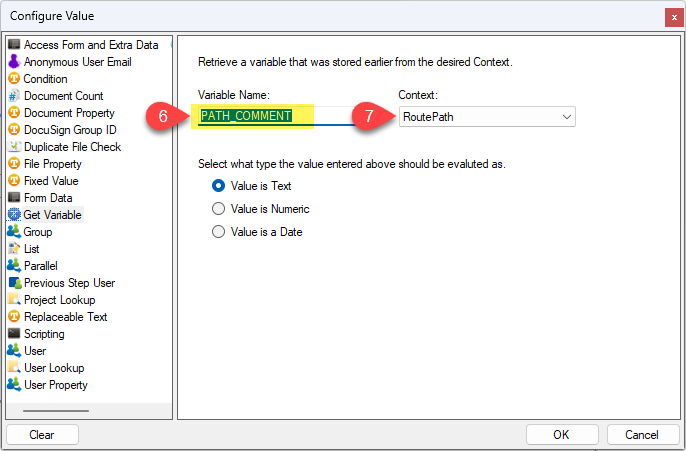
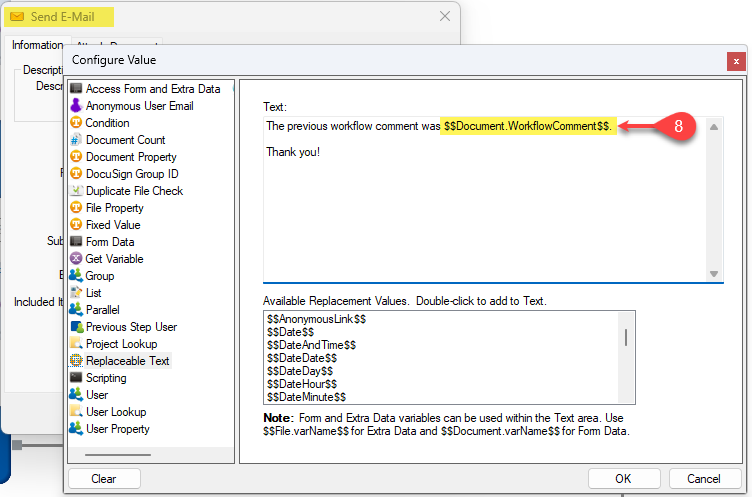
8) Form Data variables can be used within the Text area of the body of an Email stencil. Use $$Document.varName$$ for Form Data. So in this example, use $$Document.WorkflowComment$$". The value of the workflow comment will now be in the variable named "Document.WorkflowComment".