![Logo_IMS Technology Group_Final_IMS TG_Logo_Dark Bkg.svg]](https://knowledge.imstechnologygroup.com/hubfs/Logo_IMS%20Technology%20Group_Final_IMS%20TG_Logo_Dark%20Bkg.svg)
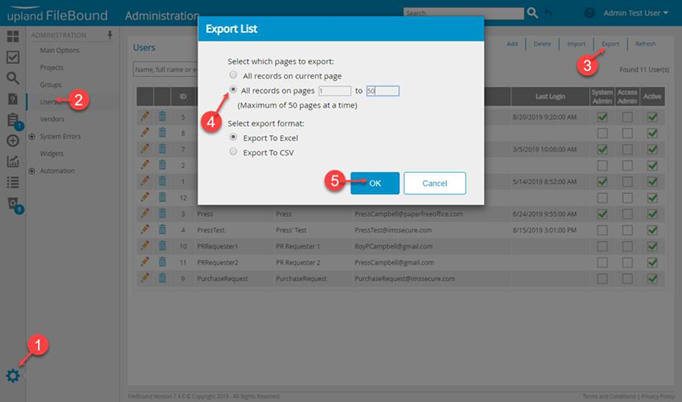
- Once you are signed in to FileBound as a System Admin select the gear in the lower left corner of your browser.
- Click on Users under the ADMINISTRATION column.
- Click on Export
- Select the radio button for All records on pages and key in 1 for the beginning and 50 for the end.
- Click OK
- This will export a list of users into Excel
FB 8.x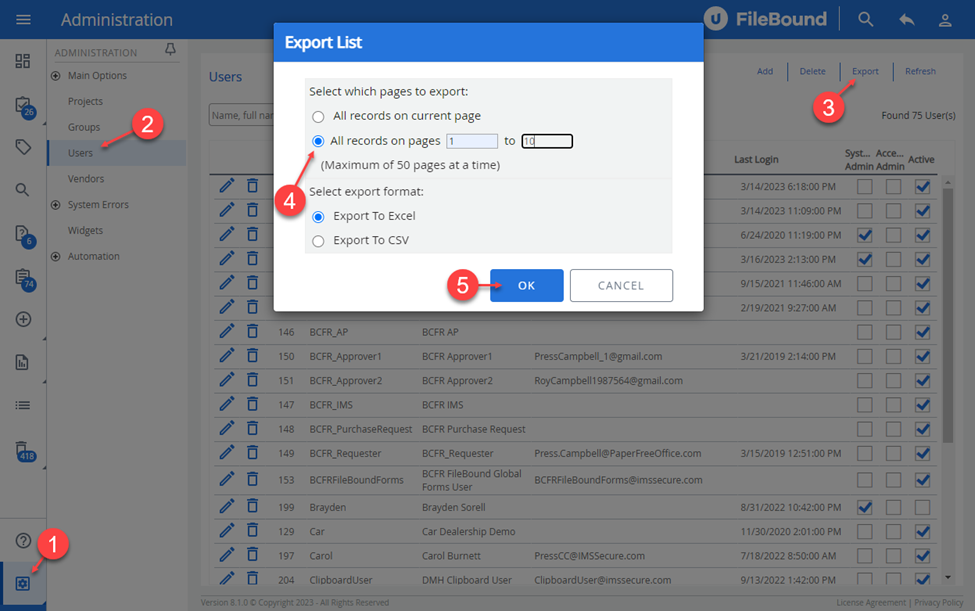 FB 7.5.x