![Logo_IMS Technology Group_Final_IMS TG_Logo_Dark Bkg.svg]](https://knowledge.imstechnologygroup.com/hubfs/Logo_IMS%20Technology%20Group_Final_IMS%20TG_Logo_Dark%20Bkg.svg)
Military Time Form Field:
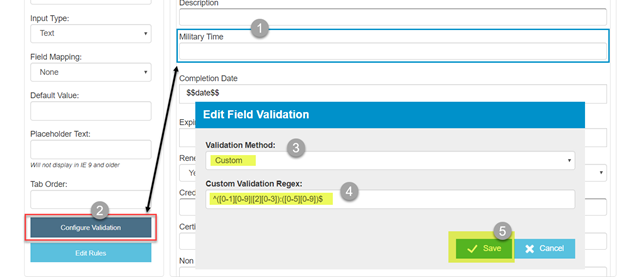
You could use a single line text and a custom regex script. Add a single line text field to your form, select “Configure Validation”, select “Custom” validation method and use the follow regex script.
^([0-1][0-9]|[2][0-3]):([0-5][0-9])$
You could also create drop-down fields for this, one for hours and one for minutes, then the user selects from the drop-downs, both fields need to be required. However, if you're mapping the time to an index field this won't work so well.