![Logo_IMS Technology Group_Final_IMS TG_Logo_Dark Bkg.svg]](https://knowledge.imstechnologygroup.com/hubfs/Logo_IMS%20Technology%20Group_Final_IMS%20TG_Logo_Dark%20Bkg.svg)
- Open Adobe Reader DC or Acrobat Standard DC.
- Go to the EDIT menu and select the Preferences submenu.
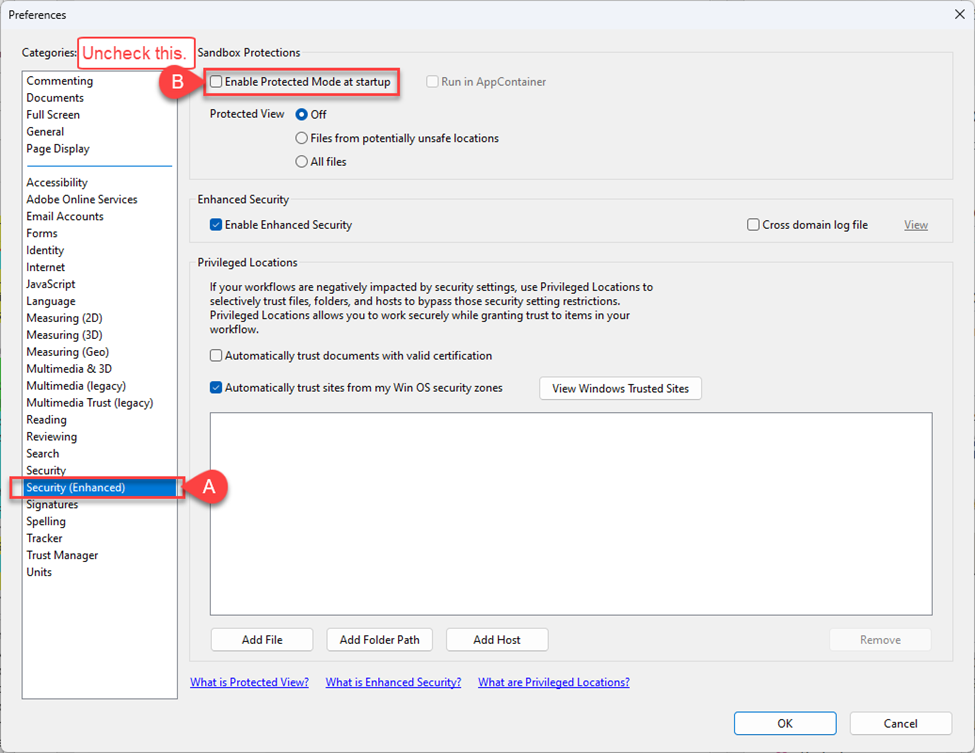
- Select Security (Enhanced) from the categories on the left-hand side.
- Uncheck the “Enabled Protected Mode At Startup” option in the Sandbox protection area.
Adobe Reader 9 – XI may have this information in the GENERAL category instead of the SECURITY (ENHANCED) category