
- IMS Knowledge Base
- FileBound
- Capture
-
FileBound
- Add Content
- Active Directory
- Administration
- Automation Processes
- Basic Search & Retrieval
- Capture
- Clipboard
- Connect
- Database
- Document Actions
- DocuSign
- E-Forms
- Enterprise Service
- Full Text Search
- General
- HelloSign
- Https
- Importer Pro
- Installation
- Licensing
- Maintenance
- Office 365
- Records Management
- Reports
- SAML
- Web Viewer
- Windows Viewer
- Workflow
-
Windows Settings
-
MS Teams Help
-
Equipment Guides
-
Scanners
-
Psigen
-
Code Snippets
-
PaperVision
How do I License FileBound Capture or Importer Pro/Lite?
This article provides instructions for licensing FileBound Capture or Importer Pro/Lite.
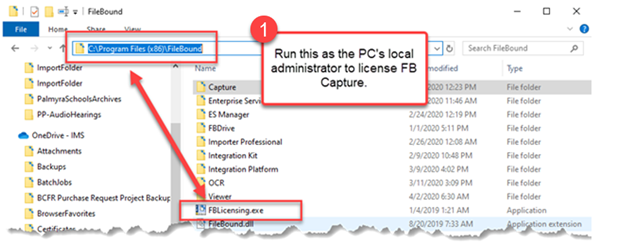
- Run “FBLicensing.exe” as the local administrator to license FileBound Capture. It is located in director c:\Program Files (x86)\Filebound.
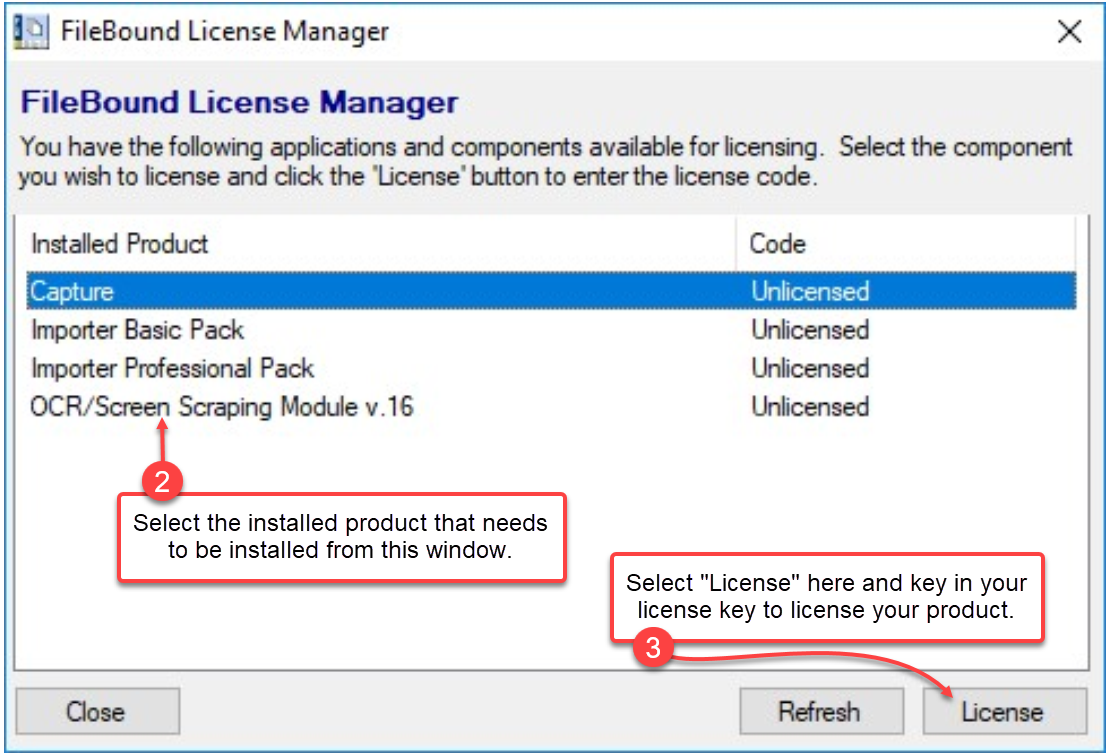
- Select the installed product that needs to be licensed from the FileBound License Manager screen as shown below.
- Select "License" and key in your license key to license your product.
 *Note - Each key can only be used once. If the license key is used on multiple PCs, both PCs will most likely change to demo mode.
 - Once complete verify “Users” have modify rights to the directory C:\ProgramData\FileBound Capture Lite, if they don’t please give them that authority.